
Official Odoo Silver Partner · Certified ERP Migration
Xero to Odoo Migration Partner
Outgrown Xero's volume thresholds, basic inventory, and expensive patchwork of third-party SaaS apps? Our Irving, TX migration specialists move your chart of accounts, tracking categories, customers, vendors, multi-warehouse stock, and open transactions into Odoo with penny-exact reconciliation.
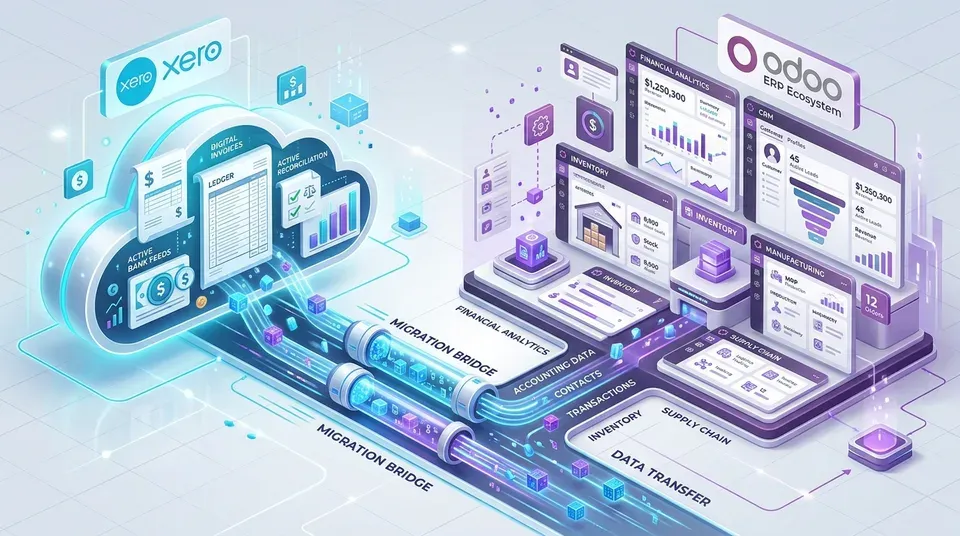
Why Fast-Scaling Businesses Outgrow Xero for Unified Odoo ERP
Xero is popular for straightforward cloud bookkeeping, but product-centric companies, distributors, and manufacturers hit severe operational barriers as transaction volume expands: strict invoicing volume thresholds, rudimentary stock tracking with no multi-warehouse or bin-level control, zero native manufacturing or bill of materials (BOM) functionality, and the heavy subscription cost of bolting on 5 to 8 separate paid SaaS apps just to manage inventory, CRM, quoting, and dispatch.
As an official Odoo Silver Partner headquartered in Irving, TX, DFW IT Partner leads turnkey Xero to Odoo migrations. Through 57+ ERP deployments and 15 certified functional consultants and technical engineers, we consolidate your fragmented SaaS subscriptions into one lightning-fast, fully integrated Odoo ERP ecosystem—preserving clean, audit-ready accounting continuity.
Everything We Migrate From Xero Into Odoo ERP
Using direct Xero API extraction and purpose-built Python ETL data pipelines, we extract, cleanse, and structure your financial and operational records cleanly into Odoo Accounting, Inventory, Sales, and Purchasing:
- Chart of Accounts, Tracking Categories & Historical Balances: Modernizing bloated accounts, converting Xero Tracking Categories into multi-dimensional Odoo Analytic Plans, and importing monthly historical trial balances for seamless comparative P&L and Balance Sheet reporting.
- Customers, Contacts, Vendors & Tax Details: Full contact profiles, billing and shipping addresses, payment terms, tax numbers, and 1099/W-9 vendor tracking.
- Products, Untracked/Tracked Inventory & Valuation: Migrating active SKUs, categories, sales/cost price tiers, standard/AVCO/FIFO valuation layers, and opening warehouse quantities.
- Open AR Invoices, Open AP Bills, Credits & Prepayments: Transferring every unpaid customer invoice, open vendor bill, customer deposit, credit note, and open purchase order with exact aging dates.
- Bank Feeds, Payment Gateways & Tax Rules: Reconnecting automated U.S. bank and credit card feeds, clearing legacy clearing accounts, and configuring Clover, Stripe, ACH, and automated sales tax calculation.
Certified 3-Point Validation Before Production Go-Live
DIY spreadsheet imports routinely double-count revenue or leave receivables out of balance with the general ledger. Every Xero to Odoo migration we execute is verified against three strict audit checkpoints:
- 1. Master Record Row-Count Check: Complete row-by-row reconciliation across active customers, vendors, inventory items, and GL accounts.
- 2. Penny-Exact Financial Tie-Out: Side-by-side verification confirming Odoo's Trial Balance, Balance Sheet, P&L, AR Aging, and AP Aging match Xero reports to the exact cent.
- 3. End-to-End Workflow Validation: Testing partial payments, credit applications, bank feed matching, and automated inventory valuation postings inside an isolated staging sandbox before launch.
Proven Case Study: Consolidating Cloud Apps into Unified Odoo ERP
Fast-growing eCommerce and distribution brands often start on Xero, then patch together third-party inventory add-ons, separate shipping tools, and spreadsheet pricing sheets as sales accelerate. As SKU counts cross into thousands and multi-channel orders surge, sync failures between external apps and Xero create accounting chaos.
DFW IT Partner migrates growing companies off fragmented Xero tech stacks into native Odoo ERP—uniting inventory, multi-location fulfillment, Shopify/eCommerce, and automated general ledger accounting in one central system.
- Explore Golf Carts Modified Case Study: See how unified Odoo ERP replaced disconnected software, automating dropship procurement, multi-channel stock, and accounting.
Rapid Weekend Cutover, Team Training & Ongoing Care
Because Xero is cloud-native, our data engineers execute complete automated test extractions without interrupting your daily business. After your finance and operational leaders validate and sign off inside staging UAT, we execute final delta synchronization over a scheduled weekend window.
Your business closes Friday in Xero and opens Monday morning live in Odoo—supported by hypercare, hands-on team training, and optional managed monthly Odoo bookkeeping.
- Full Data Migration to Odoo Methodology: Explore our deep ETL, cleansing, and multi-system ERP data migration practice.
- Odoo Accounting & Finance Setup: See how we configure automated bank feeds, 3-way matching, and real-time perpetual inventory accounting.
- Wholesale & Distribution ERP: Upgrade Xero with multi-warehouse routing, automated replenishment, and shipping integrations.
- Odoo Manufacturing ERP: Add multi-level BOMs, shop-floor work centers, and real-time production costing.
FREQUENTLY ASKED QUESTIONS
Xero to Odoo Migration FAQs
Need to walk through your specific setup?
Talk with our certified team.
When should a growing business move from Xero to Odoo?
Businesses outgrow Xero when they exceed several thousand monthly transactions, need multi-warehouse or bin-level inventory tracking, require manufacturing BOMs and production scheduling, operate multiple legal entities, or spend thousands per month on disconnected third-party add-ons (Cin7, DEAR, Unleashed, TradeGecko).
How do Xero Tracking Categories translate into Odoo?
Xero uses tracking categories to tag transactions by department, region, or project. Odoo translates these into flexible Analytic Plans and Accounts. In Odoo, you can tag transaction lines with unlimited analytic dimensions and split costs across multiple cost centers with zero clutter in your General Ledger.
Can Odoo replace the separate third-party apps we currently connect to Xero?
Yes. Most companies migrating from Xero eliminate 4 to 8 standalone paid subscriptions (inventory apps, CRM, quoting software, time tracking, POS, and eCommerce connectors) by consolidating everything into native, unified Odoo modules.
Will our historical Profit & Loss and Balance Sheet remain intact in Odoo?
Yes. We import monthly historical trial balances alongside all open receivables, payables, orders, and customer history. This provides instant multi-year comparative financial reporting without bloating your new database with millions of old transactional logs.
How do you guarantee zero financial discrepancy between Xero and Odoo?
Every cutover includes our 3-point migration certification: master row-count verification, penny-exact tie-out of the Trial Balance, AR Aging, AP Aging, and Inventory Valuation reports, and state verification for open orders.
How much operational downtime occurs during a Xero to Odoo cutover?
Near zero. Because we rehearse the complete extraction, mapping, and transformation pipeline in staging beforehand, the final production delta cutover completes over a single scheduled weekend without interrupting weekday operations.
Can Odoo handle multi-currency and multi-entity operations better than Xero?
Significantly better. Odoo natively supports complex multi-company environments with automated intercompany transactions, real-time multi-currency revaluation, consolidated balance sheets, and shared charts of accounts or vendors.
OFFICIAL ODOO SILVER PARTNER
Planning a Move From Xero to Odoo?
Share your monthly invoice volume, user count, active third-party add-ons (Cin7, DEAR, Shopify, HubSpot), and target go-live window. Speak directly with our certified ERP migration architects.
- Direct scoping session with certified functional consultants & senior developers
- Standard ERP configuration first—custom code only where justified
- U.S.-led delivery headquartered in Irving, TX · 57+ ERP deployments