
Official Odoo Silver Partner · Cloud ERP Migration
QuickBooks Online to Odoo Migration Partner
Replace outgrown QuickBooks Online limits and disconnected SaaS add-ons with one unified ERP. Our Irving, TX specialists migrate your QBO ledger, classes, contacts, inventory, and open AR/AP into Odoo with certified penny-exact accuracy.
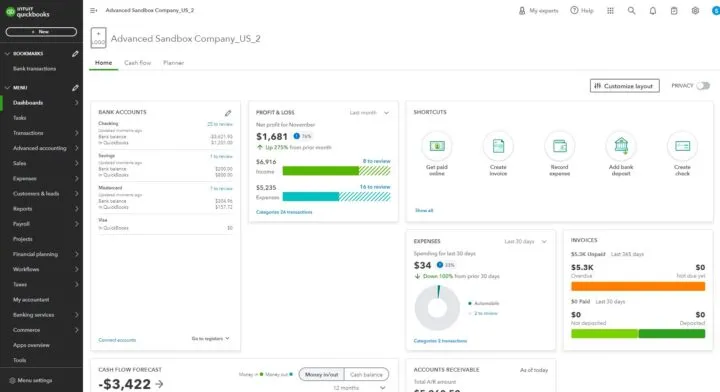
When Growing Businesses Outgrow QuickBooks Online for Unified Odoo ERP
QuickBooks Online (QBO) makes early-stage cloud bookkeeping easy, but scaling product, distribution, manufacturing, and service companies hit a wall fast: rudimentary inventory tracking, zero multi-level BoMs or barcode warehouse routing, rigid reporting limits, and a sprawling patchwork of paid SaaS apps just to handle CRM, quoting, eCommerce, and projects.
As a verified Official Odoo Silver Partner headquartered in Irving, TX, DFW IT Partner leads turnkey QuickBooks Online to Odoo migrations. Through U.S.-led delivery, we replace disconnected cloud subscriptions with one integrated Odoo ERP database while preserving clean, audit-ready accounting continuity.
Everything We Migrate From QuickBooks Online Into Odoo
Using direct QuickBooks Online API extraction and purpose-built Python ETL pipelines, we cleanse legacy clutter and map your financial and operational records cleanly into Odoo Accounting, Inventory, and Sales:
- Chart of Accounts, Classes, Locations & Historical Balances: Modernizing bloated QBO charts, converting QBO Classes and Locations into Odoo Analytic Plans, and importing monthly historical trial balances for seamless year-over-year reporting.
- Customers, Sub-Customers, Vendors & 1099 Records: Preserving billing/shipping addresses, payment terms, tax-exempt statuses, and W-9/1099 vendor tracking.
- Products, Services, Bundles & Opening Stock Valuation: Migrating SKUs, categories, QBO Bundles into Odoo kits/BoMs, vendor costs, and reconciled warehouse stock quantities.
- Open AR Invoices, Open AP Bills, Credits & Unbilled Orders: Transferring every unpaid customer invoice, open vendor bill, customer deposit, credit memo, and open PO/estimate with exact aging dates.
- Bank Feeds, Merchant Gateways & Tax Rules: Re-connecting live U.S. bank/card feeds, clearing legacy "Undeposited Funds" clutter, and configuring Stripe, Clover, ACH, and sales tax automation.
Certified 3-Point Validation Before Production Go-Live
DIY spreadsheet imports routinely double-count revenue or leave open AR aging out of sync with the general ledger. Every QuickBooks Online to Odoo migration we execute is verified against three strict audit checkpoints:
- 1. Master Data Row-Count Check: Complete reconciliation of exported vs. imported active customers, vendors, products, and GL accounts.
- 2. Penny-Exact Financial Tie-Out: Side-by-side verification confirming Odoo’s Trial Balance, Balance Sheet, P&L, AR Aging, and AP Aging match QuickBooks Online to the exact cent.
- 3. End-to-End Workflow Verification: Testing partial payments, credit applications, bank feed matching, and inventory valuation postings inside an isolated staging sandbox prior to launch.
Rapid Weekend Cutover, Team Training & Ongoing Bookkeeping
Because QuickBooks Online is cloud-accessible via API, our engineers run automated test extractions without interrupting your daily billing. After your finance and operations leads sign off inside staging UAT, we execute final delta synchronization over a single weekend—followed by hands-on Odoo Accounting training and optional monthly Odoo bookkeeping support.
- Enterprise Data Migration to Odoo: Migrating CRM, Shopify, or warehouse spreadsheets alongside QBO? See our multi-source migration practice.
- Odoo Accounting & Finance Setup: Explore automated bank feeds, 3-way PO bill matching, and real-time perpetual inventory accounting.
- Managed Monthly Odoo Bookkeeping: Let our ERP accounting specialists run your daily Odoo reconciliations and month-end closes post-launch.
FREQUENTLY ASKED QUESTIONS
QuickBooks Online to Odoo Migration FAQs
Need to walk through your specific setup?
Talk with our certified team.
What data moves over during a QuickBooks Online to Odoo migration?
We migrate your Chart of Accounts, historical monthly trial balances, QBO Classes/Locations (mapped to Odoo Analytic Accounting), customers, vendors, 1099 flags, products/bundles, inventory counts, and all open AR invoices, open AP bills, credits, and open orders.
How do you verify that our QuickBooks Online numbers match Odoo 100%?
Before cutover sign-off, we deliver a 3-point migration reconciliation comparing master record counts, Trial Balance / P&L / Balance Sheet totals, and Customer AR & Vendor AP Aging reports down to $0.00 variance.
How long does it take to migrate from QuickBooks Online to Odoo?
A focused QuickBooks Online to Odoo Accounting, Sales, Purchasing, and Inventory rollout typically completes in 3 to 6 weeks depending on data cleanliness, SKU volume, and additional operational modules.
Can you clean up messy QBO "Undeposited Funds" or duplicate contacts during migration?
Yes. Pre-migration data hygiene is built into our ETL process—we deduplicate customer/vendor records, archive obsolete accounts, and help isolate legacy suspense or Undeposited Funds discrepancies so your new Odoo ledger starts clean.
Will our U.S. bank feeds, ACH payments, and 1099 filings still work in Odoo?
Yes. Odoo Accounting connects directly to thousands of U.S. banks and credit cards for automated daily feeds, generates NACHA ACH payment files, integrates with Stripe/Clover/Authorize.net, and tracks 1099 vendor payments natively.
Do you train our bookkeeper or controller on Odoo Accounting before go-live?
Yes. Every migration includes hands-on role training inside a staging copy of your actual migrated QuickBooks Online data, plus go-live hypercare so your finance team closes their first month in Odoo with total confidence.
OFFICIAL ODOO SILVER PARTNER
Ready to Move From QuickBooks Online to Unified Odoo ERP?
Tell us your QBO tier, monthly transaction volume, connected apps (Shopify, CRM, inventory), and target timeline. Speak with our Odoo migration leads.
- Direct scoping session with certified functional consultants & senior developers
- Standard ERP configuration first—custom code only where justified
- U.S.-led delivery headquartered in Irving, TX · 57+ ERP deployments